Speaking my thoughts
I’ve been experimenting with voice interfaces for a while now. On my iPhone, voice-to-text is my primary way of interacting with ChatGPT and Claude. It’s faster than typing, and the models are good enough to understand the intention behind my words. But at my desk, where I spend most of my working day, I’ve stuck with the keyboard.
Until recently, there was a gap I couldn’t bridge.
Voice Mode Everywhere Except Where I Need It
Anthropic publishes a compelling article about Claude’s voice mode and its use cases: daily planning, learning, creative thinking, note-taking, idea capture. For me, the creative thinking part resonates most. I don’t want to write my way to clarity. I want to talk my way there. I want to offload the mechanics of typing and let the AI help me organize and structure the thoughts afterward.
Unfortunately, Claude’s voice mode only works in Claude for Mobile, Claude Desktop, and the web. Not in Claude Code, which is where I spend much of my productive time. Also, I want to have something that works independent of any application. Sometimes a plain text editor is just fine.
I’d tried a workaround. I’d open a Microsoft Teams meeting, record myself, transcribe it, then feed the raw text to an AI for cleanup or for getting structured content out of it. It worked, but it was mechanical and clumsy. There must be something better.
Open Source, Local, and Free
I looked into commercial solutions first. Whisperflow AI is polished and works exactly as I would expect: voice-to-text where the output can be fed into any application, including tools without built-in dictation. But it requires a commercial account, and I wanted something that runs locally without a subscription.
Then I found OpenWhispr.
It’s an open-source desktop application for Mac, Windows, and Linux. Free. The AI models for speech-to-text can run locally. The website is well-designed. And it solves the exact problem I had.
How It Works (And How I Configure It)
OpenWhispr is simple: you install it, it runs in the background, and you trigger recording with a keyboard shortcut (Ctrl + Windows key, in my case). Speak. Hit the shortcut again. The audio is transcribed and the text appears in your cursor position—like a dictation app, but for your whole computer.
What makes it powerful is the flexibility in how it processes speech.
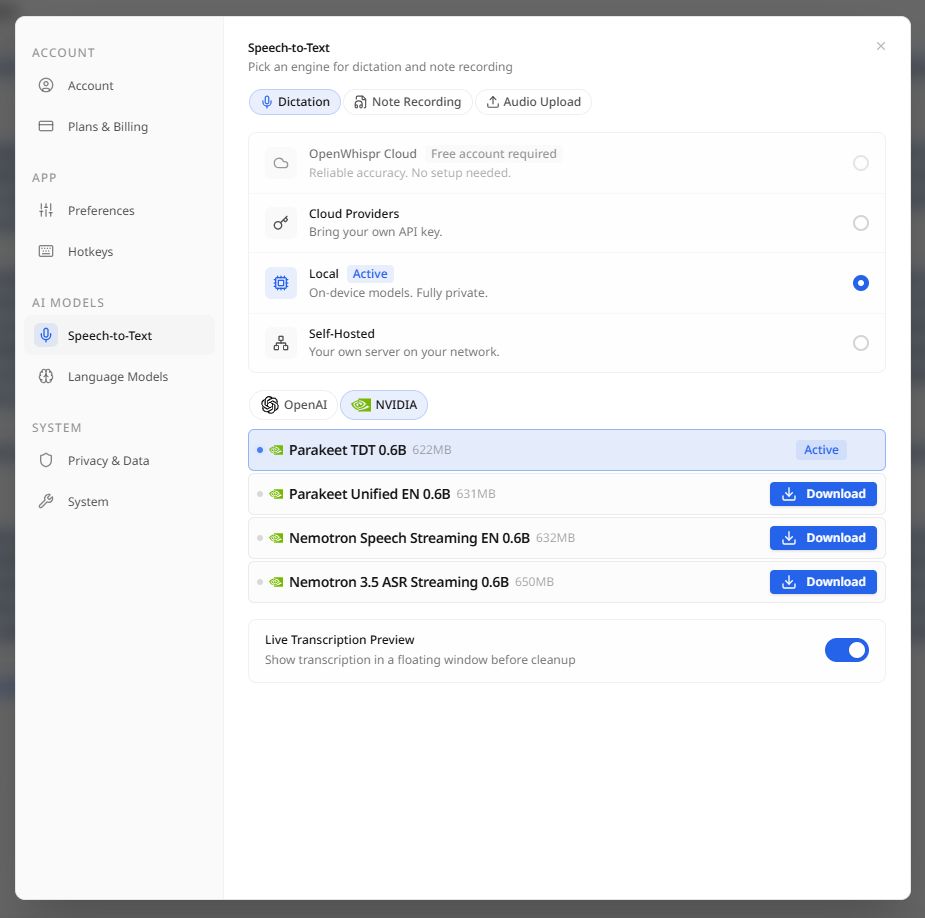
For the speech-to-text model, you have options:
- Use OpenWhispr’s cloud service (2,000 free words per month, then paid)
- Bring your own API key to a cloud provider
- Run a local model
For the cleanup phase (polishing the raw transcript with an LLM), you can:
- Use OpenWhispr’s cloud models
- Use Azure or another provider
- Run a local model (if your hardware can handle it)
My setup uses OpenWhispr’s Parakeet model for speech-to-text—it’s small enough to run on CPU, handles German and English well, and I’m satisfied with the quality. For the cleanup step, my computer isn’t powerful enough to run a large language model locally at reasonable speed, so I use a cloud-based model for that polishing phase.
It’s a hybrid approach: local transcription, cloud polish. Faster than full local processing, and still keeps my audio on my machine initially.
Limitations
There’s one constraint that’s genuinely annoying: OpenWhispr needs to keep focus on the insertion point while it transcribes and polishes. You hit record, speak, stop recording, and then you’re locked to that window until the processing is done. When I switch to another application and move the cursor, the text gets lost and I have to re-record.
Why This Matters to Me Now
The deeper insight here is about matching the tool to your thinking mode. When I’m in Claude Code building something, I’m often in a state of exploration: trying an idea, seeing what breaks, iterating. Typing tends to slow me down and force me to articulate before I’m ready. Speaking lets me think out loud. Then I can work with the transcript: feed it to an AI for structure, use it as a prompt, turn it into documentation.
OpenWhispr doesn’t replace Claude’s voice mode which is better integrated and faster for pure conversation. But it extends voice thinking to my entire computer. For someone who spends their day moving between writing, tools and code, that’s valuable.
If you’re in a similar situation and you want voice-to-text on your PC, you care about privacy or want to avoid subscriptions, or you just think better when you speak, it’s worth a look. 4,900 GitHub stars suggest I’m not alone.